Sign in & watch
Plex · Emby · Jellyfin
Members use connected media-server accounts. Library markers show what’s already available.
 storieson hand
SELF-HOSTED · OPEN SOURCE
Movie night. One more chapter.
A show you didn’t know you needed.
Find and request what you read and watch in one place. Stories on Hand handles the search, follows the request, and tells you when it’s in your library.
Early public release · No account needed for the demo
LESS APP HOPPING. MORE GOOD STORIES.
Search together, request what you want, and see what’s ready. The same flow for the family, with more control for the person running the server.

BOOKS BELONG HERE TOO
Open a book’s series or author collection and check the titles before you request. Movies have collections; shows have seasons. Choose the parts you want.
Missing volumes and incomplete source information stay visible. A partial series should never quietly become “done.”
Explore reading in the demo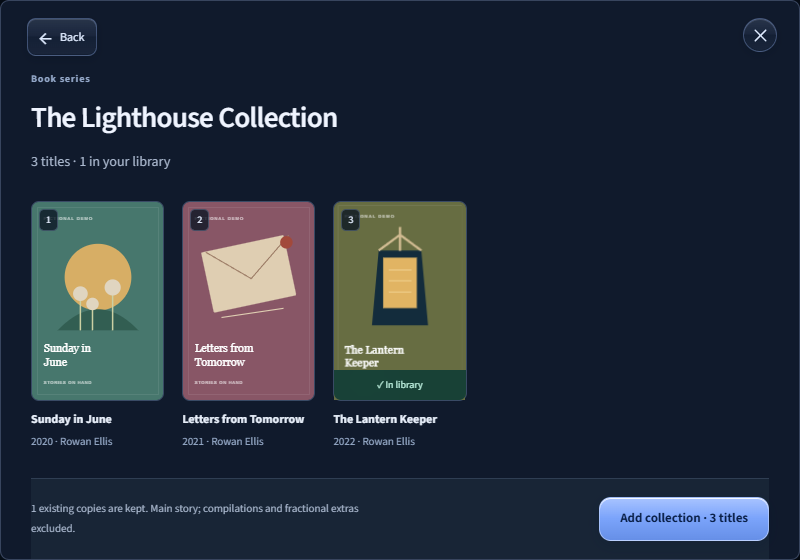
A collection preview in the app · Fictional example
YOUR SERVER, CONNECTED
Stories on Hand has its own request and acquisition engine. It connects to the services that search, download, play and serve your library.
Plex · Emby · Jellyfin
Members use connected media-server accounts. Library markers show what’s already available.
Prowlarr · SABnzbd · qBittorrent
Keep your search provider and download clients. Choose source priority, quality preferences and destination folders.
Kavita · Grimmory · Audiobookshelf
Open connected reading libraries. Administrators can enable automatic accounts for Kavita and Grimmory and choose approved libraries. Audiobookshelf uses its own account.
Still being built. Full replacement parity, some source workflows, and complete TRaSH scoring remain unfinished. Check compatibility before changing your setup.
PUT IT TO WORK
Install the prebuilt container with Docker Compose, connect your services, then review your profiles and folders. Downloads start paused, so you can get things right first.
Testing with your current suite? Pause Sonarr/Radarr or stop their containers. Keep the old apps, configuration and data until you are satisfied with Stories on Hand. Keep Prowlarr and the download clients you use running. Read the transition guide.
Installation guideBrowse the source on Forgejo# Stories on Hand — prebuilt Docker Compose example.
#
# Run your own Prowlarr, download clients and media/reading servers separately.
# Connect them in Settings after setup. This file does not install those apps.
# Guide: https://storiesonhand.com/help#administrator-setup-checklist
#
# FIRST INSTALL ONLY:
# docker compose pull
# docker compose run --rm setup
# docker compose up -d storiesonhand
#
# Setup asks for your application address and administrator sign-in.
# Downloads start paused. Add/review library mounts before enabling imports.
# When updating, KEEP your existing config/data/media paths and skip setup.
# Do not replace an established stack with these fresh-install folder defaults.
name: storiesonhand
services:
storiesonhand:
image: storiesonhand.com/storiesonhand/storiesonhand:latest
pull_policy: always # check the registry before starting the prebuilt image
# :latest = recommended tested build; :beta = preview channel.
# Pin a build by changing BOTH image lines, for example :0.2.3-alpha.1.
restart: unless-stopped
ports:
- "127.0.0.1:18187:8080" # local address : host port : container port
# Open http://localhost:18187 on this computer after setup.
# For other devices, use an HTTPS reverse proxy; see the installation guide.
volumes:
- ./config:/config:ro # private administrator settings and encryption/session keys
- ./data:/data # database, saved connections and application state
- ./testing:/testing # isolated test imports; not your existing library
# OPTIONAL MEDIA FOLDERS: change the left side to folders on your server,
# then uncomment the lines you need. The right side is the app's path.
# Mount existing media/downloads read-only; import destinations need write access.
# - /path/to/media:/existing:ro
# - /path/to/media/downloads:/downloads:ro
# - /path/to/media/library:/library/video
# - /path/to/media/books/library:/library/reading
# The app uses user/group 1000:1000; grant it access to the chosen folders.
# Choose category folders and path mappings in Settings before enabling imports.
# Keep these mounts on this service only; setup must not touch existing media.
# Guide: https://storiesonhand.com/help#folders-and-existing-library-matching
# The app runs as user/group 1000:1000; setup initializes the private folders.
read_only: true
tmpfs:
- /tmp:size=64m,mode=1777
security_opt:
- no-new-privileges:true
cap_drop:
- ALL
# Default resource limits for the application.
mem_limit: 512m
cpus: 1.0
pids_limit: 128
logging:
driver: json-file
options:
max-size: "10m" # rotate logs instead of growing without limit
max-file: "3"
# One-time setup tool. It exits after initialization; it is not a second app.
setup:
image: storiesonhand.com/storiesonhand/storiesonhand:latest
pull_policy: always
profiles: [tools]
user: "0:0" # initializes only the three private folders below
command: [python, -m, storiesonhand_web.bootstrap]
stdin_open: true
tty: true
network_mode: none
volumes:
- ./config:/config
- ./data:/data
- ./testing:/testing
# ./config, ./data and ./testing are folders beside this Compose file.
# Keep them when replacing containers. Do not copy setup mounts to existing media.
curl -fL https://storiesonhand.com/compose.yaml -o compose.yaml
docker compose pull
docker compose run --rm setup
docker compose up -d storiesonhand
Run these commands in an empty installation folder. Setup lets you choose your address and administrator credentials. No source build or registry account is needed.
A FEW THINGS TO KNOW
An early release you can explore without connecting a single service.
Browse fictional titles, search, open details, inspect collections and explore settings. It is a separate read-only application with no real accounts, files, credentials or connected services. Requests, downloads and changes are disabled.
Test the workflows you depend on first. Full parity is not finished. Pause Sonarr/Radarr or stop their containers while evaluating acquisition. Keep the old applications, configuration and data until you are satisfied. Keep Prowlarr and the download clients you use running.
No entertainment content comes with the software. You must have permission, an appropriate license or another valid legal basis for the content and activities involved. Read the legal and responsible-use notice.
No. This is open-source software you run on your own server. Playback and reading use the libraries and applications you connect. The project website does not provide a shared content library or a central personal account.